
+3days
Telegram
The bonus remains active while channel membership is maintained. It is checked automatically once per day; once revoked, it cannot be claimed again.
Open Telegram channel ↗Counter-Strike 2 cheat with Aimbot, ESP, Triggerbot, Bunny Hop, Sound ESP and Skin Changer.
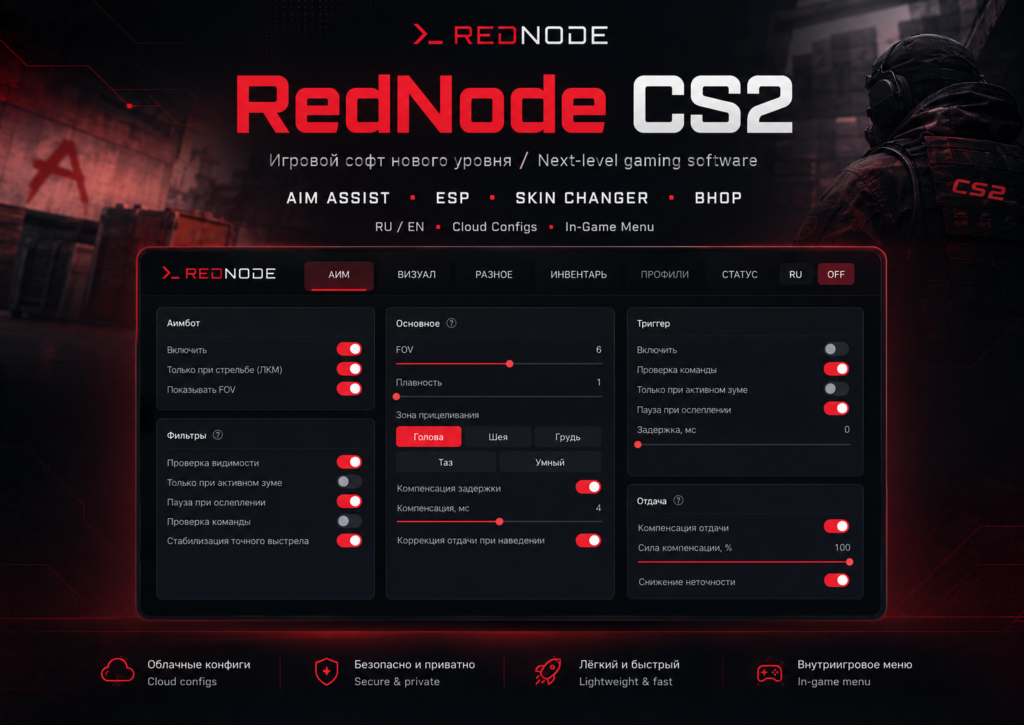
AIM, visual tools, movement, Sound ESP, HUD features and an extended Skin Changer are included. Browse the screenshots, open the feature section you care about, then jump straight to the overview or pricing.
A one-time bonus for this product. Join the Telegram channel and verify your membership.
The bonus remains active while channel membership is maintained. It is checked automatically once per day; once revoked, it cannot be claimed again.
Open Telegram channel ↗Open a screenshot to view it larger.
Choose a section and expand it to see all available features and settings.
Flexible aim assistance with separate checks and behaviour tuning for different scenarios.
Smart Mode lets you set a separate head-priority percentage. The selected zone is kept for the current burst so AIM does not jump chaotically between body parts.
Some information is surfaced from in-game audio events even when the source is not directly in front of the player.
A dedicated RedNode CS2 module with search, filters and skin images directly in the menu.
Each config keeps one current state. Settings are available to the client through the protected OAuth API and sync with the RedNode account.
Diagnostic logs are not exposed to the user on the website; they are available only to RedNode administrators for troubleshooting a specific issue.
See how the interface looks and how the product works in game.
Active RedNode license
Internet connection for authorization and license checks
Supported 64-bit Windows version
Current Counter-Strike 2 version
New purchases are currently disabled. Follow the project news.
Previously issued access remains in your account, subject to its current terms and expiry.
Review the requirements and setup guide for the current project version.
RedNode CS2 combines popular CS2 features in one client: Aimbot, Triggerbot, Recoil, WH/ESP, Glow, Skeleton ESP, Bunny Hop, Auto Strafe, Sound ESP, Bomb Timer, Hit Sound and an extended Skin Changer. This page contains the full feature list, current product status, compatibility and pricing.
Access is tied to a RedNode account. Client authorization uses the system browser with OAuth 2.0 + PKCE, devices are managed in the account, and current builds are delivered through protected downloads. Cloud configs keep the current settings state and can sync between supported devices.
If you are looking to buy a CS2 cheat with aimbot, ESP/wallhack, triggerbot, bunny hop or a skin changer, compare not only the feature list but also current status, requirements, authorization, updates and support. RedNode does not promise an absolute “no ban” guarantee; current availability and compatibility are shown directly on the project page.
RedNode CS2 is a Counter-Strike 2 software product with AIM/Aimbot, ESP/WH, Triggerbot, Recoil, Movement, Sound ESP, HUD features, Hit Sound and a dedicated Skin Changer / Inventory. Access, licenses, devices, downloads and cloud configs are managed through RedNode.
Main areas include Aimbot with FOV and smoothing, target zones and Smart Mode, Triggerbot, Recoil, Player ESP, Glow/Outline, Grenade Helpers, Bunny Hop/Auto Strafe, Sound ESP, Bomb Timer and HUD alerts, Hit Sound, plus a Skin Changer with search, filters, knives, Paint Kit, Wear, Pattern Seed and StatTrak.
Choose a plan directly on the RedNode CS2 page. After successful payment the license appears in your account together with downloads and device controls. If you already have a key from an external marketplace, you can redeem it in the account.
The direct RedNode price is shown on the project page. External marketplaces and resellers may add their own fees or markup, so it is worth comparing the current official-site price before buying a key elsewhere.
The client uses OAuth 2.0 Authorization Code + PKCE and opens the system browser. You approve the sign-in on RedNode, then the app receives its own protected session. WordPress passwords and Telegram tokens are never passed to the client.
No. While the saved access token is valid, the client checks the license immediately. If it expires but the refresh token is still valid, the session is refreshed silently. Full browser authorization is required only when the existing session can no longer be refreshed.
RedNode stores one current state for each config. The client can save settings to the cloud and load them after authorization. Historical config versions are not kept. The user can delete a config from the account.
After a valid license is activated, the current build becomes available in the Downloads section of your account. Protected files are served only to an authorized device with valid access.
The website does not expose a separate diagnostic-log viewer to the user. RedNode may keep up to three latest log sessions for support, and only administrators can view them while troubleshooting a specific issue.
The project page shows current compatibility. The baseline RedNode CS2 configuration targets 64-bit Windows 10/11 and the current Counter-Strike 2 version. Always check the live status and requirements on this page before purchasing.
No. No third-party product that interacts with an online game can honestly promise an absolute no-ban guarantee. RedNode shows the current product status and updates compatibility information, but use always carries risk for the game account.
The current price depends on the selected access period and is always shown in the pricing section on this page. Direct RedNode purchases use the site price; an external marketplace or seller may apply its own fee.
After payment or key activation, the license appears in your account. The current build can be downloaded from the protected Downloads section after authorization, and the file is available only while the license is valid.
The Skin Changer includes an image gallery, search and filters, weapon and rarity selection, knife models, Paint Kit, Wear, Pattern Seed, StatTrak and kill counter. Cosmetic settings are saved with the user profile.
Reviews and questions
Ratings and reviews come from product owners. You can ask a question before buying.
Want to write something?
Sign in with Telegram. You can then ask a question, and product owners can leave a review and rating.